BLUF
This was almost certainly a credential phishing attempt. The biggest red flags were themismatched sender address, the .HTM attachment, and the instruction toopen the attachment and sign in. That combination is a classic setup for stealing your email password or other login credentials.
Credential Phishing Alert: Fake “Secure Message” Email Targeting Ranger Association Members
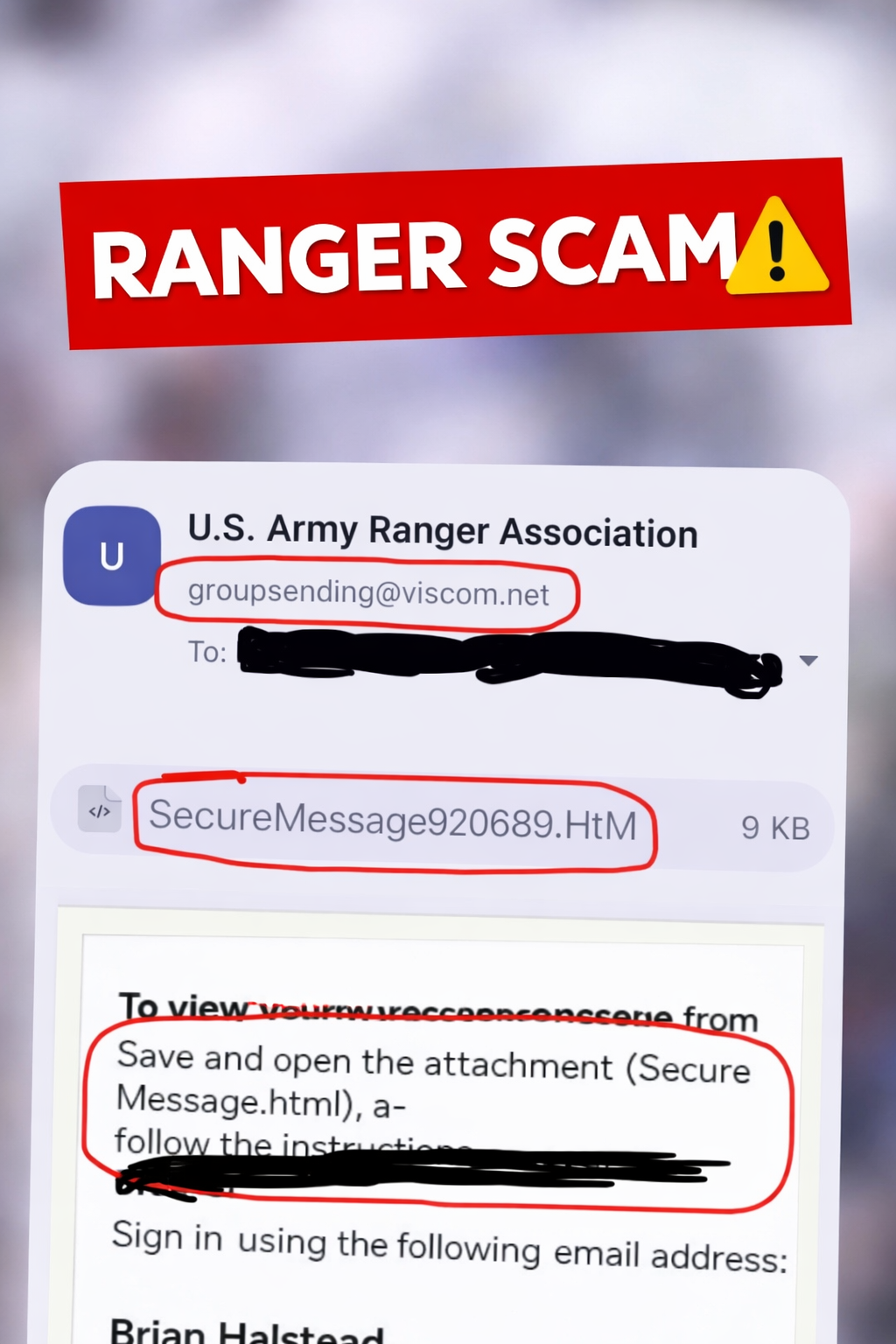
I came across a suspicious email that claimed to be a special report from theU.S. Army Ranger Association, but the real goal appeared to be something else:getting the recipient to open an HTML attachment and enter their credentials.
On the surface, the message tried to look official. It used organization branding, a named sender,and “secure message” language. But once you slow down and inspect it, the red flags start stacking up fast.
Why this looked suspicious
- The sender address did not match the organization name. The email showed a sender tied to the Ranger Association, but the actual sending address was groupsending@viscom.net.
- The attachment was an HTML file. The file name SecureMessage920689.HTM is a major warning sign. Legitimate secure communications usually direct you to a known portal, not to an HTML attachment that you have to open locally.
- The message told the user to “save and open the attachment” and then sign in. That is a common phishing workflow used to capture usernames and passwords.
- The email leaned on urgency and trust. Using a military or association-related subject line is a smart social engineering move because it lowers the recipient’s guard.
The biggest red flags
1) Mismatched sender
If an email claims to come from a trusted association but the actual sender domain is unrelated,that should immediately put you on guard. Attackers rely on people noticing the display nameand ignoring the real address.
2) HTML attachment instead of a normal message
An .HTM or .HTML attachment can open a fake login page in your browser.That page may look convincing, but it can still be a credential harvesting trap.
3) Instructions to sign in after opening the file
That is the key move. The attacker wants you to believe you are accessing a secure message,when in reality you may be handing over your email login or Microsoft 365 credentials.
IT Guy Tip
A legitimate secure-message system usually sends you to a known vendor portal or established login page.It does not usually require you to download a random HTML attachment and authenticate through it.
What the attacker was likely trying to do
The goal was likely simple: get the target to open the attachment, land on a fake sign-in page,and enter their credentials. Once the victim types that information in, the attacker can try to:
- Access the victim’s email account
- Reset passwords on other accounts
- Send more phishing emails from a trusted inbox
- Gather personal or organizational information for follow-on attacks
What to do if you receive something like this
- Do not open the attachment.
- Do not enter your password anywhere unless you independently verified the site.
- Check the real sender address, not just the display name.
- Contact the organization directly using a known phone number or official website.
- Report the message as phishing in your email app.
- Delete it after reporting.
What to do if you already clicked it
If you opened the attachment but did not enter credentials, the risk is lower, but you should still be cautious.If you entered your email password or other login details, take action immediately:
- Change your password right away
- Enable multi-factor authentication if it is not already on
- Review recent account login activity
- Watch for unexpected password reset emails
- Alert your IT department or service provider
Bottom line
This email used a trusted-looking name, a fake “secure message” workflow, and an HTML attachmentto try to get the recipient to log in. That is textbook credential phishing. Slowing down and checkingthe sender, attachment type, and instructions is often enough to catch it before any damage is done.
Screenshot reviewed and annotated for phishing awareness training. Always verify suspicious messages through an independent, trusted source before interacting with attachments or login prompts.